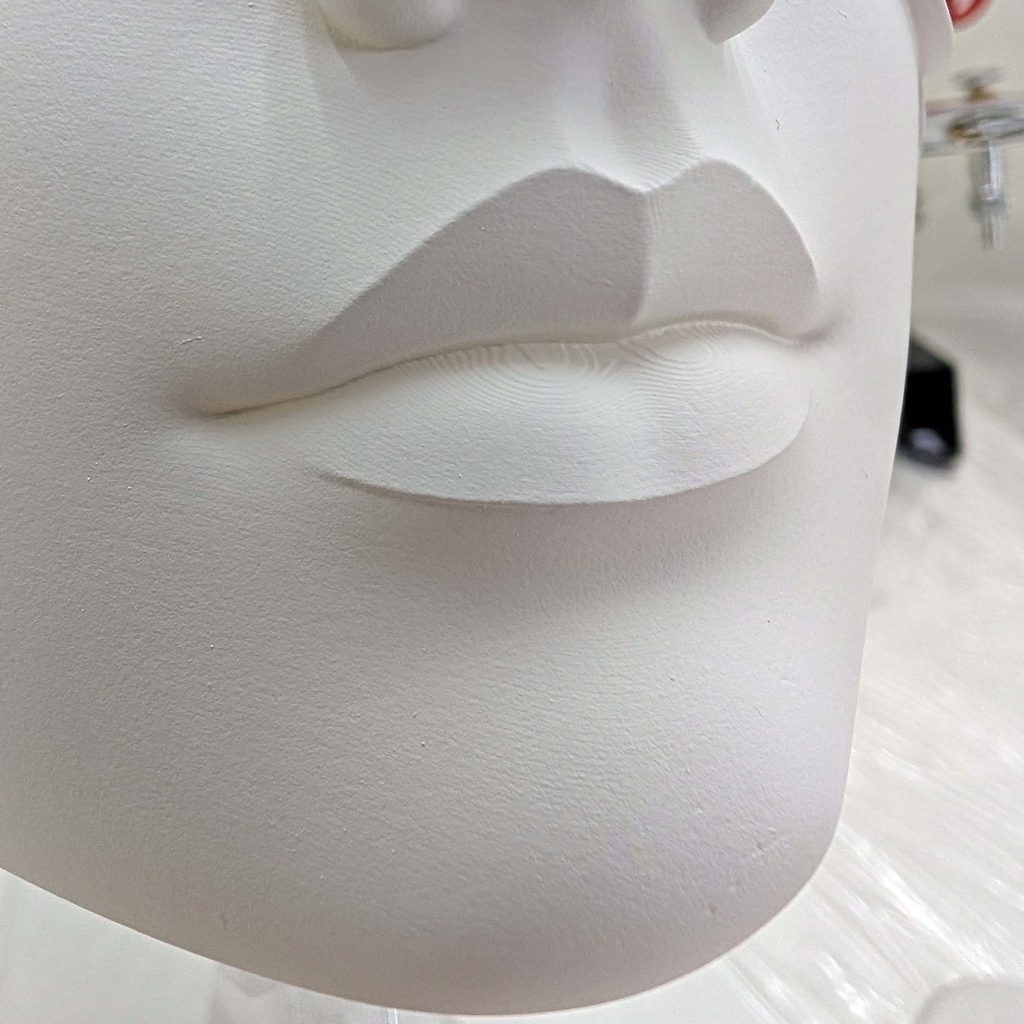
Every finisher knows the finishing tax. You spend days pushing a CAD model until the organic curvature is exactly right, run the print, and then lose a week in a respirator working 120, 220, 400, 600. Spot putty. High-build primer. And the whole time you’re making a quiet bet: that leveling the layer ridges won’t also erase the crisp character lines you spent those days building.
I wanted to find out if there was a way to skip the up-front rough surface work entirely. What I needed was a display-grade cosmetic shell — a foundation for multi-color airbrushing with ultra-thin pigment. At sub-millimeter nozzle apertures, the paint film is microscopic. Every low spot, every seam, every stair-step telegraphs straight through the finish under studio light.
So I stopped fighting layer lines and had the part produced through PCBWay’s SLA service in UTR 8360 White Resin.
What follows is the raw surface quality out of the box, why the engineering spec of this particular photopolymer changes the prep math, how the industrial process differs from the resin printer on my own bench, and the workflow that took the part from shipping box to a flawless paint foundation.
Understanding the Canvas: Why UTR 8360 for Cosmetic Work
PCBWay’s photopolymer menu is deep — tough resins like UTR 8220, high-temp UTR-Therm formulations, flexible elastomers. For fine finishing work, UTR 8360, their cataloged standard white photopolymer, wins on a few specs in particular: it’s run on industrial SLA with a 355 nm UV laser, it cures to 84 Shore D, and it comes off their line as a fully polymerized thermoset.
Here’s what each of those actually means once the part is in your hands.
1. Fully polymerized thermoset: it’s non-porous
On FDM prints we’re always fighting micro-voids between toolpaths and perimeter walls. Solvents and primers wick into those fissures, then expand or shrink weeks after the piece is finished — that’s where hairline ghost cracks come from. Desktop LCD resin has its own version of the problem, for reasons I’ll get into further down.
Industrial SLA cures differently. A galvo-driven 355 nm solid-state laser sweeps a liquid vat, and the resulting part is isotropic and closed-cell — no stair-stepping from extruded layers, none of the voxel artifacts you get off a hobbyist LCD machine. Primer sits on the surface instead of disappearing into it. Nothing you spray today comes back to haunt you in a month.
2. Full conversion: the monomer that isn’t there
This is the one that doesn’t show up in photos, and it’s the one most likely to wreck a paint job months after you’ve called the piece finished.
When UV kicks off free-radical polymerization, not every resin molecule cross-links into the solid network. The part hardens fast — vitrification locks loose monomers in place before they ever find a reactive site. A “green” print straight off a desktop machine is only about 60–75% converted. A basic UV post-cure in a turntable box gets you to roughly 85–95%, which sounds close enough until you understand what the remaining percentage does.
Trapped monomer migrates. Over weeks it works its way to the surface and leaves a faintly sticky film — the phenomenon people call sweating. That film lifts primer, kills paint adhesion, and blisters topcoats from underneath. The same unreacted material keeps reacting to ambient UV, which shows up later as delayed shrinkage, warping, and micro-cracking. It’s also a contact irritant that continues to off-gas VOCs the whole time.
Industrial workflows attack this from three directions at once: high-conversion resin chemistry to begin with, heated high-intensity post-cure rather than a hobby turntable, and ultrasonic degreasing to pull residual liquid resin off the surface before it can cure into the finish. PCBWay’s standard post-processing covers all of it, which is why I was comfortable committing days of airbrush work to this part without wondering what the plastic would be doing to my paint film next spring.
3. 84 Shore D: hardness is the whole argument
Soft plastics gum up abrasives and roll burrs when you scuff them. At 84 Shore D, UTR 8360 is hard and glassy enough to cut cleanly — fine abrasives generate a sharp, uniform micro-scratch profile without gouging or digging flat spots into a compound curve. That’s the difference between keying a surface and reshaping it.
4. A neutral white substrate reads honestly
Sand a black photopolymer and you get chalky stress lines that make surface artifacts almost impossible to interpret — is that a scratch, or just discoloration? UTR 8360’s eggshell white gives you an even field where raking light shows true artifacts and nothing else.
Unboxing and Factory Surface Inspection
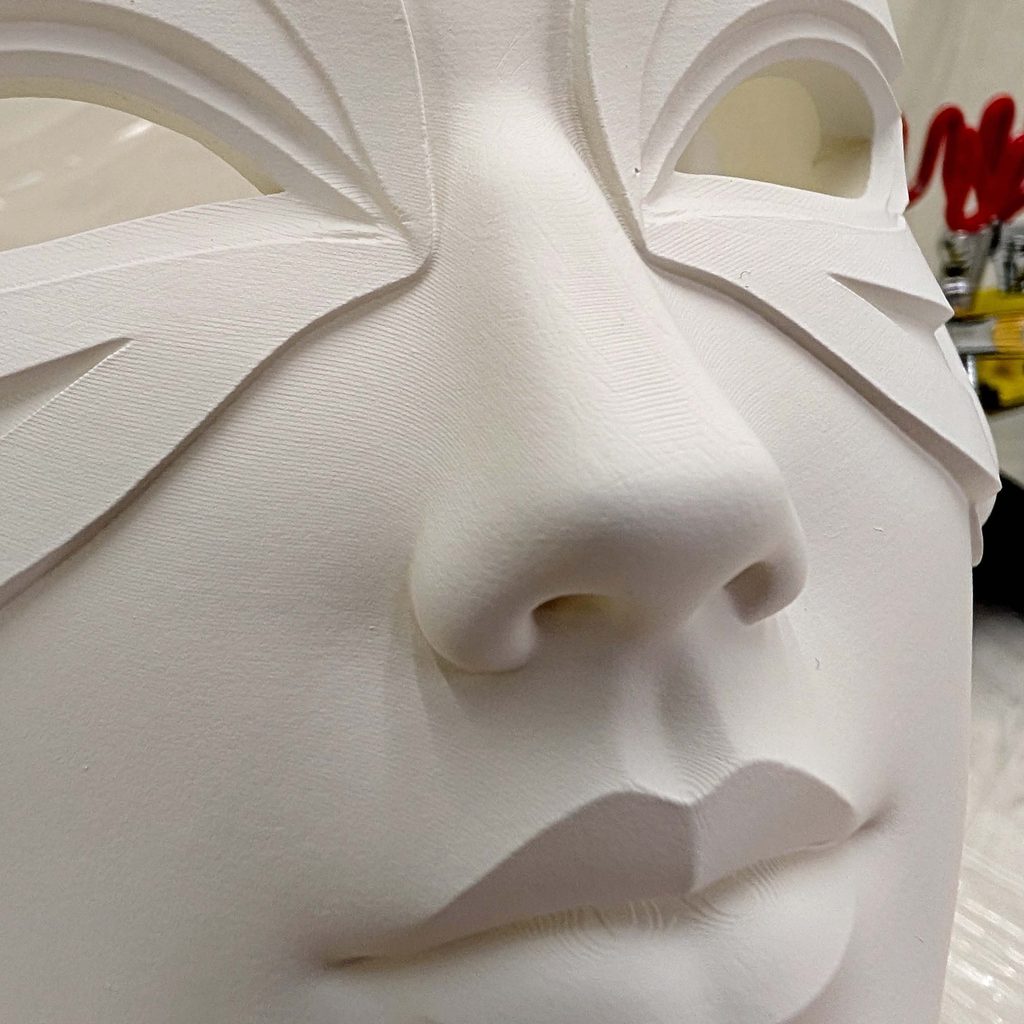
The part arrived wrapped in ample bubble wrap. The moment I unwrapped it I knew this was in a different category of quality than anything I’d worked with before. The absence of stepping along the compound curves was obvious right off the bat. I looked at it from every angle, ran my fingers across it, and it was hands-down the smoothest print I’ve ever encountered. I had no idea that kind of smoothness could come straight off the machine. The simple truth is that I was really surprised at just how good this print was.
PCBWay’s default post-processing covers solvent washing, full UV post-cure, and manual support removal. The support pips on non-critical interior faces had already been clipped and leveled flush by their technicians. The primary cosmetic face was unmarred — no gouges, no pitting, and virtually zero stepping artifacts. And when I say virtually zero, I mean you have to go looking to find any at all.
The only marks worth mentioning were the two venting ports, which are unavoidable when printing a model this large in resin. PCBWay clearly made an effort to place them where they’d be least noticeable, and I can’t fault them for that — there’s no way around venting ports, and they put them exactly where I would have.
Bigger Layers, Smoother Part: Why Desktop Resin Doesn’t Compare
Here’s the detail that genuinely threw me. My desktop MSLA machine defaults to a 0.05 mm layer height and can be pushed as fine as 0.01 mm. PCBWay’s standard SLA runs at 0.1 mm, with 0.05 mm available on request for high-detail work. On paper, the desktop machine is slicing twice as fine as the part that showed up at my door — and the part that showed up at my door is dramatically smoother. So layer height isn’t the variable that matters. The process is.
How the resin gets cured. A consumer MSLA machine exposes an entire layer at once through an LCD mask, so your XY resolution is the screen’s pixel pitch — somewhere around 18–35 µm on a modern 8K or 14K panel. Sharp, but it’s a grid, and a grid leaves voxel edges on any curve that doesn’t happen to align with it. PCBWay’s machines steer a UV laser with galvanometers and trace each layer as continuous vectors with a beam spot around 75–100 µm. A bigger spot, but it’s drawn as a smooth path rather than stamped as pixels, and the overlap between adjacent passes blends instead of tiling. That’s what you feel under your fingertips.
Peel force. This is the quiet killer on desktop resin. A bottom-up vat has to tear every finished layer off the FEP or PFA film, and that suction pulls on the part through the entire print. It’s where micro-ridges, Z-axis delamination, and flexed thin walls come from. PCBWay’s top-down vats with a recoater blade have no peel step at all — the part descends into the resin and a blade levels the next layer across it. Zero suction, zero tearing.
What that buys you at scale. Desktop machines are excellent on small, self-contained pieces — miniatures with sharp micro-texture are their home turf. Push past about 300 mm of span, or try a wide flat panel, and the suction deflection starts showing up as bow and dimensional drift. PCBWay quotes ±0.2% (or ±0.1 mm, whichever is greater) held consistently across the whole envelope, and their large-format capacity runs to 2100 × 800 × 700 mm. For a cosmetic shell with broad, thin-walled curvature, that’s the difference between a part that matches the CAD and a part you have to fight.
Surface Preparation: Do Not Skip These Steps
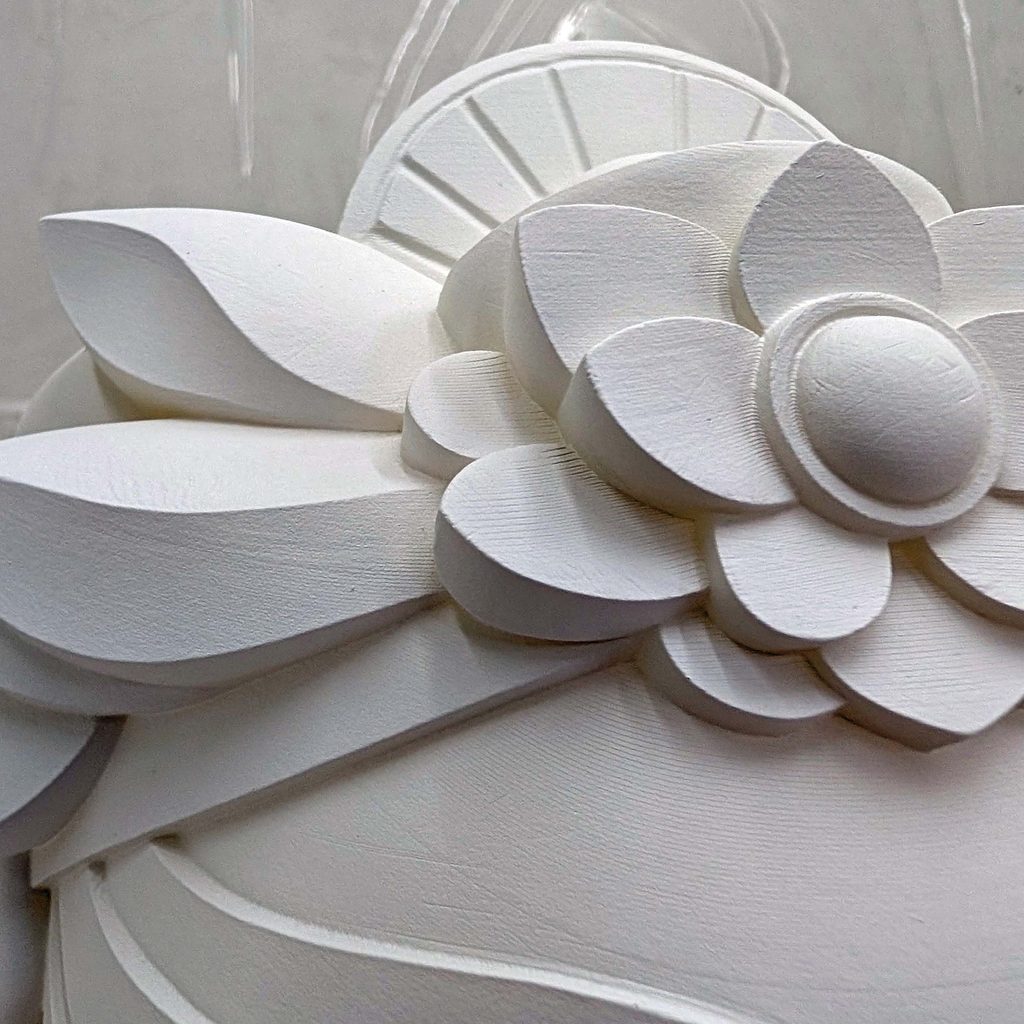
This is normally where I begrudgingly reach for 220 or 400 wet/dry and start grinding. I’ll be blunt: I hate that part. It’s why I ran this test in the first place.
And I’m not exaggerating when I say the entire rough sanding phase was unnecessary. Aside from keying the surface with a Scotch-Brite pad, the only abrasive that touched this part was a 2000-grit sanding sponge — and that was strictly between coats. The print itself needed no sanding at all. For comparison, on past FDM builds I’ve had to resort to a foot sander to level combined parts (thank you MM’s Prop Shop for that cheat code — IYKYK).
Step 1 — Keying the surface for primer adhesion
Coatings don’t stick well to plastics. Plastics are low surface-energy materials, which is a chemistry problem more than a texture problem: the surface simply doesn’t give a coating much to bond to. The fix is mechanical. I gave the entire piece a gentle, thorough scrub with an ultra-fine Scotch-Brite hand pad, working until the factory sheen was uniformly dulled — that dulling is the visual signal that the keying you want is there.
The pad conforms into compound curves, recesses, and tight radii without touching the detail, which is exactly why I reach for it instead of paper on a shape like this. The whole pass took maybe ten minutes. This single step does more to keep paint where you put it than anything else you can do, because even the best paints for plastic are mediocre at gripping a smooth substrate.
Worth noting what I didn’t have to do first: on a green or lightly post-cured desktop print, you’d want to degrease and check for surface tack before any of this, because scuffing a part that’s still sweating monomer just smears it around. This one came out of the box chemically finished, so a scuff and a tack wipe was the entire surface story.
Step 2 — Adhesion promoter
The second best thing you can do about that adhesion problem is chemical. I picked up a can of Dupli-Color Plastic Adhesion Promoter from the automotive paint aisle at a nearby hardware store; other brands should work just as well.
A light coat is all you need. Once it has flashed off — the solvents evaporate within a minute or two — your first coat of primer needs to go down within about 30 minutes. Adhesion promoter works by temporarily raising the surface energy of the plastic, and that effect fades, so the window matters.
Step 3 — Dry micro-leveling
I ended up laying down about five coats of primer to get an even, light base. After each coat I de-nibbed with a dry 2000-grit foam sanding sponge. The foam core spreads fingertip pressure evenly across curvature instead of concentrating it into a point. Used dry, 2000 grit behaves more like a polisher than a cutter — it planes off airborne dust nibs and leaves the primer slick without cutting through high-relief edges.
Water as a lubricant would have flushed the dust away and kept the abrasive cutting longer, but the mess wasn’t worth it here. I’m working in acrylic, and I don’t want standing water anywhere near layers that can potentially re-wet after they’ve dried.
Airbrushing
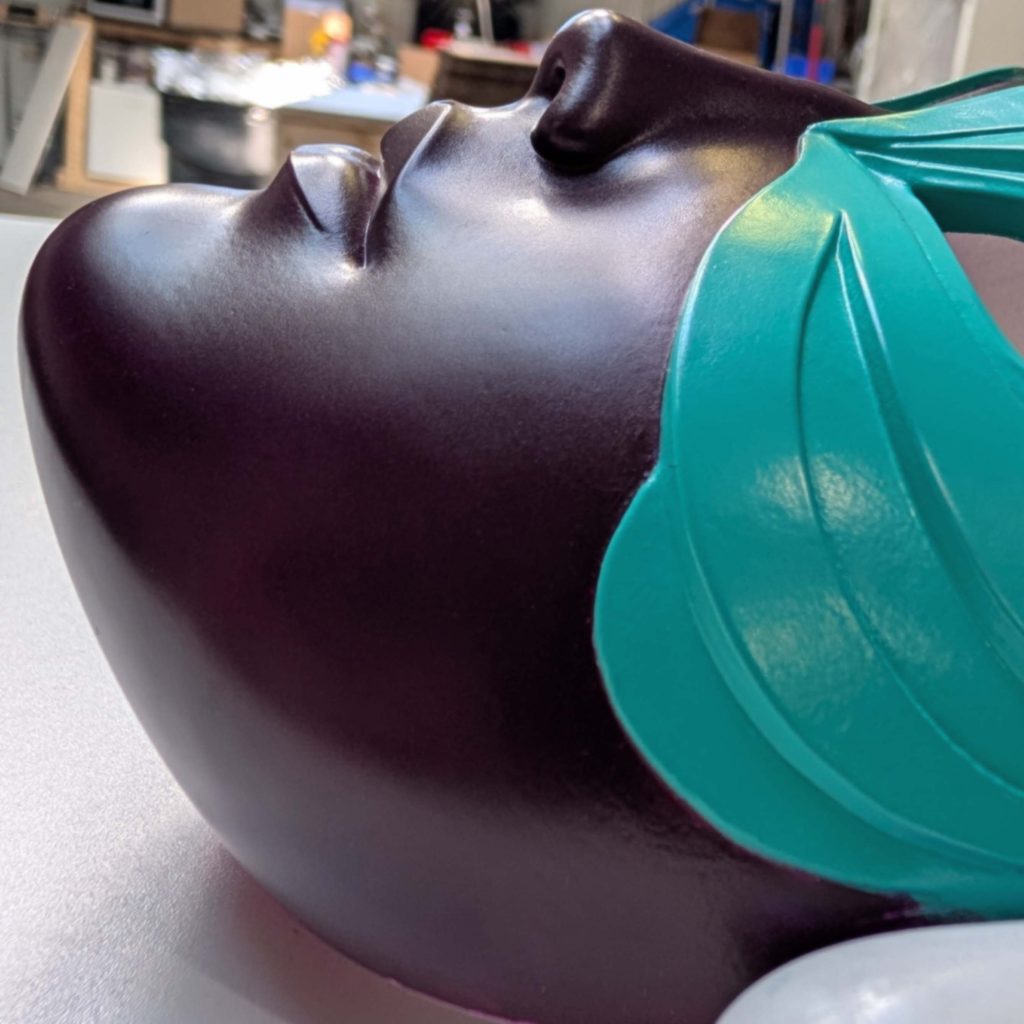
With the surface at a glass-smooth satin, I started laying in color with Golden High Flow Acrylics reduced with Golden Airbrush Medium. High Flow delivers professional pigment saturation at an ink-like viscosity, which is exactly what fine work needs. Other brands would serve — Createx comes to mind — but I have the most mileage with Golden, so that’s what I stuck with.
Reducing with a genuine acrylic airbrush medium rather than water is not optional here. The medium preserves the binder matrix, extends open time against needle tip dry, and lets the pigment form a cohesive film on a non-porous substrate instead of beading or pooling.
Two brushes, two jobs:
Base coats — Harder & Steenbeck Evolution CRplus, 0.4 mm. Broad coverage and foundational color transitions. Consistent atomization, wet coats wrapping the complex curves with no pooling and no orange peel on the sealed SLA surface.
Detail and blends — Harder & Steenbeck Infinity CRplus, 0.15 mm. Shading, micro-gradients, and crisp edge work once the base was locked in.
That second stage is where the UTR 8360 prep pays for itself. Spraying through a 0.15 mm needle at low PSI, the pigment layer is thinner than the defects it would have to cover — a single stair-step or texture artifact catches the overspray and the illusion collapses. Because the scuffed resin took the micro-leveled primer so evenly, the atomized paint laid perfectly flat, with no edge creep and no feathered blowout along the masked lines.
The Verdict: Labor Preservation
The real return on an industrial SLA print from PCBWay isn’t that the part looks good in the box (although it certainly did look very good). It’s labor preservation, and in a very big way.
Everything between unboxing the part and shooting the first layer of primer was complete in ten minutes with a Scotch-Brite pad and a light coat of adhesion promoter. No rough sanding, no filler putty, no respirator marathon — and that work would have taken me a full day, realistically two. Meanwhile every sharp crease and subtle curve survived exactly as it left the 3D file.
If you’re building an art piece, a prop, or a high-detail model where the paint job makes or breaks the result, UTR 8360 through PCBWay is, in my experience, hands-down the cleanest foundation you can start from.